Best Loud Alarm Clock for Seniors: Big Digits Win

Loudness only matters if the display is readable and the buttons make sense. Here's how five alarm clocks compare on decibels, digit size and setup, with a winner for heavy sleepers and an alternate for tight nightstands.

By Cody HartUpdated 14 min read
On this page
- Best loud alarm clock for seniors at a glance
- What actually decides this purchase
- How I screened these five clocks
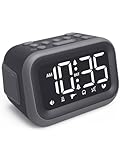
- 1. Acedeck Super Loud Alarm Clock — Best overall
- 2. Peakeep Digital Alarm Clock for Bedroom Bedside — Runner-up
- 3. Netzu Digital Alarm Clock for Bedrooms — Best budget pick
- 4. Odokee Digital Alarm Clock — Best for beginners
- 5. Sharp Digital Alarm Clock — Best for small spaces
- How loud is loud enough?
- Can a senior read and set it without glasses?
- What the listings do not tell you
- The verdict
- FAQ
The best loud alarm clock for seniors is the Acedeck Super Loud Alarm Clock, which the brand rates at 115dB with a 4.2-inch LED display. If your nightstand is tight, the Sharp Digital Alarm Clock is the smaller pick at 2.25 x 4.35 x 1.5 in. Here is the short version by profile: the Acedeck for volume, the Peakeep for readable digits, the Netzu when price decides it. Match the clock to the sleeper, not the spec sheet.
None of these listings is marketed only at older adults, so treat "for seniors" as your own filter, not a promise the box makes. What you can judge is digit size, loudness, and how the buttons work. Those three things decide whether a clock helps or frustrates.
Best loud alarm clock for seniors at a glance
| Pick | Loudness | Digit / display | Price |
|---|---|---|---|
Best overall Acedeck Super Loud Alarm Clock |
115dB claim | 4.2" LED | Check Price |
Runner-up Peakeep Digital Alarm Clock |
5 volume levels | 2" digits | Check Price |
Best budget pick Netzu Digital Alarm Clock |
4 volume levels | 48mm digits | Check Price |
Best for beginners Odokee Digital Alarm Clock |
110dB claim | 2" digits | Check Price |
Best for small spaces Sharp Digital Alarm Clock |
Loud alarm claim | Red LED | Check Price |


What actually decides this purchase
Most guides to the best loud alarm clock for seniors lead with decibels. Volume matters, but it is not the thing that decides the purchase. The clock that gets returned is usually the one nobody could set.
Three things decide it, in this order:
- Can the sleeper read the time without glasses? Digit height is the number to check. Two of these clocks state 2-inch digits, and the Netzu states 48mm, which is close to the same.
- Does the alarm actually wake the person? A 115dB claim beats a vague "loud alarm" claim on paper. Volume control matters too, so a light sleeper can dial it down.
- Can they change the alarm time in the dark, half-awake? Clearly labeled buttons and simple controls decide this, and the listings vary a lot here.
Here is the trick with loud clocks. A high decibel rating does nothing if the owner sets the alarm for 6 a.m. instead of 6 p.m. because the buttons confused them. Loudness is easy to advertise. Readability and simple setup are what you actually live with. I lined up the digit sizes, the stated loudness, and the control descriptions side by side, and that is where these five separate.
How I screened these five clocks
I started from the criteria a shopper for an older relative actually weighs, then ranked against them.
- Digit size and display type first. A clock you squint at fails before the alarm rings. I gave weight to stated digit height and display brightness controls.
- Stated loudness second. Two clocks publish a decibel figure. The rest describe volume in levels or as "loud", which I treated as weaker evidence.
- Control simplicity third. Keyboard-style buttons and "easy to set" claims counted here.
- Power and backup fourth. Battery backup keeps the alarm alive through an outage, which matters for anyone who relies on it.
What got cut in my thinking: any clock that only described itself as loud with no digit figure and no control detail would have ranked last. Every one of these five gives at least two of the three deciding facts, so all five made the list. The order reflects how well each one covers digits, loudness and setup together. The Acedeck leads because it is the only pick pairing a 115dB claim with a 4.2-inch display. The Sharp ranks last on features but wins its niche on footprint.
1. Acedeck Super Loud Alarm Clock — Best overall
The Acedeck pairs the highest stated loudness in this set, 115dB, with the largest display, so it covers the two things a heavy sleeper needs most.
Best for: heavy sleepers who need real volume Skip it if: your nightstand is very small
The Acedeck is the only pick here that states both a decibel figure and a large-screen size. Acedeck says the alarm reaches 115dB and offers 6 alarm sounds, which is the widest sound choice in this group. The display measures 4.2 inches with adjustable brightness, so a light sleeper can dim it at night while an early riser keeps it bright. The unit weighs 0.75 lb and measures 3.15 x 4.8 x 1.5 in, making it the chunkiest face here.
Acedeck lists dual alarms for two schedules and an alarm memory that holds settings on AAA backup through an outage. There is a USB port for charging a phone overnight, with AC as the main power and battery as fallback. This is the most expensive pick here, and only one seller lists it. What you trade for the volume and the big screen is desk space and a higher price position than the readable-but-quieter Peakeep. If loudness is the whole point, this is the clock.
Pros:
- Highest stated loudness in this set, 115dB
- Largest display at 4.2 inches
- Six alarm sounds, the widest choice here
- Dual alarms with AAA backup memory
- USB port for overnight phone charging
Cons:
- Most expensive pick in this group
- Chunkiest body, 3.15 x 4.8 x 1.5 in
- Only one seller lists it
- Not marketed specifically for older adults
2. Peakeep Digital Alarm Clock for Bedroom Bedside — Runner-up
The Peakeep gives you 2-inch digits and 5 volume levels in a wider face, which makes it the most balanced readable-and-loud pick short of the winner.

Best for: someone who wants big digits and volume control Skip it if: you want the loudest possible alarm
The Peakeep is the widest clock here at 3.3 x 7 in, and Peakeep says the 2-inch digits read clearly from a greater distance. That width is a plus for tired eyes and a minus on a narrow shelf. It weighs 6.4 oz. Peakeep lists 5 volume settings and 5 brightness settings, the most granular control of any pick in this group, so you can tune both loudness and glare precisely.
This is roughly mid-range for this set, and it sells faster than most of the others here. It runs on an included AC adapter for accurate timekeeping. The trade-off against the Acedeck is honest: Peakeep does not publish a decibel figure, only volume levels, so you cannot promise it hits the Acedeck's 115dB. If a person genuinely sleeps through loud alarms, the winner is the safer bet. For everyone else who mainly wants to read the time at a glance and still get a firm wake-up, the Peakeep is the more comfortable daily clock.
Pros:
- 2-inch digits readable from a distance
- 5 volume and 5 brightness settings, the finest control here
- Widest face at 3.3 x 7 in
- Several sellers stock it
- Included AC adapter for steady timekeeping
Cons:
- No stated decibel figure to compare
- Widest footprint, poor on a narrow shelf
- Single colour, blue
- Not marketed specifically for older adults
3. Netzu Digital Alarm Clock for Bedrooms — Best budget pick
The Netzu is the cheapest of the five and still delivers 48mm bold digits and dual alarms, which makes it the value play for a spare room or a gift.

Best for: a spare room or a low-cost gift Skip it if: you need battery-only operation
The Netzu is the cheapest of the six positions here and the one buyers choose most often in this group. Netzu says the 48mm blue bold font reads easily from a distance, which is close to the 2-inch digits of the pricier picks. The body is compact at 2.83 x 6.22 x 1.5 in and weighs 0.62 lb. It offers dual alarms for two schedules, 4 volume levels, 5 dimmer settings and a snooze, plus buttons Netzu describes as clearly labeled for easy operation.
There is one real catch to know. Netzu says this clock is powered by USB only, so the display and every function need a wired power connection. It keeps alarm settings in battery memory, but it will not run on battery alone. That rules it out for anyone who wants a clock that works during an outage without any cord. Against the Acedeck, you give up the 115dB rating and the larger screen. As a low-cost, readable, dual-alarm clock for a guest room or a considerate present, it earns its spot.
Pros:
- Cheapest pick in this set
- 48mm bold digits, easy to read
- Dual alarms plus 4 volume and 5 dimmer levels
- Clearly labeled buttons for simple setup
- Compact 2.83 x 6.22 x 1.5 in body
Cons:
- USB power only, no battery-only running
- Small size may feel less substantial
- Only one seller lists it
- No stated decibel figure
4. Odokee Digital Alarm Clock — Best for beginners
The Odokee pairs a stated 110dB alarm with 2-inch numbers Odokee says read across the room even without glasses, which suits someone who wants simple and loud.

Best for: someone who wants simple controls and big numbers Skip it if: you want dual alarms on a budget
The Odokee is the second clock here to publish a loudness figure, with Odokee rating the alarm at up to 110dB across 5 wake-up sounds. That sits just below the Acedeck's 115dB claim and well above the picks that only list volume levels. The 2-inch bold numbers are meant to read across the room, and there is a 5-level brightness dimmer that drops to off at night. The body measures 3.94 x 5.51 x 1.5 in and weighs 6.03 oz.
Odokee lists a battery backup that keeps the alarm going through a power outage, unlike the USB-only Netzu. It runs on an included AC adapter with a USB charging port. This is a premium price position, close to the top of the set. The trade-off is that the listing centres on a single, simple alarm and does not emphasise dual alarms the way the Acedeck, Peakeep and Netzu do. For a first clock where the goal is loud, readable and uncomplicated, that simplicity is the appeal rather than a flaw.
Pros:
- Stated 110dB alarm, second loudest here
- 2-inch numbers readable without glasses
- Battery backup keeps alarm alive in an outage
- 5 brightness levels down to off
- USB charging port included
Cons:
- Priced near the top of the set
- Dual alarms not emphasised in the listing
- Only one seller lists it
- Not marketed specifically for older adults
5. Sharp Digital Alarm Clock — Best for small spaces
The Sharp is the smallest clock here at 2.25 x 4.35 x 1.5 in with keyboard-style buttons, so it fits a crowded nightstand and stays simple to set.

Best for: a crowded nightstand or a small shelf Skip it if: you dislike red LED at night
The Sharp is the most compact pick in this group, measuring 2.25 x 4.35 x 1.5 in and weighing 0.53 lb. If shelf space is the constraint, no other clock here fits tighter. Sharp designed it around simple keyboard controls and says it is very easy to operate, which matters for anyone who dislikes fiddly menus. The red LED digits are described as extra bright and readable across the room or without glasses in the middle of the night.
There is a 9-minute snooze that keeps working until you switch the alarm off, and an alarm battery backup for outages that needs 2 AAA batteries, sold separately. This is an entry price position, the second cheapest here. The honest trade-off is what it leaves out. Sharp calls the alarm loud but publishes no decibel figure and no volume levels, so you cannot promise it matches the Acedeck's 115dB or even the Peakeep's tunable range. Red LED also bothers some people at night. As a tiny, simple, budget clock, it does its one job.
Pros:
- Smallest footprint, 2.25 x 4.35 x 1.5 in
- Simple keyboard-style controls
- Extra-bright red LED digits
- 9-minute repeatable snooze
- Second-cheapest pick here
Cons:
- No stated loudness figure or volume levels
- Red LED can disturb light sleepers
- Batteries for backup sold separately
- Only one seller lists it
How loud is loud enough?
How loud is loud enough depends on the sleeper, not a headline number. Two clocks here state a decibel figure, and it is worth knowing what that buys.
- The Acedeck states 115dB. That is the highest claim in this set and the reason it wins for heavy sleepers.
- The Odokee states 110dB. Close behind, and paired with 5 sound choices.
- The Peakeep and Netzu list volume levels, not decibels. Peakeep gives 5 levels, Netzu gives 4. You can tune them, but you cannot compare them numerically to the two above.
- The Sharp calls its alarm loud with no figure at all. Treat that as the least measurable claim of the five.
For a light sleeper, tunable volume matters more than a big number, and the Peakeep's 5 levels give the finest adjustment. For someone who genuinely sleeps through alarms, start with the stated 115dB of the Acedeck. Remember that all decibel figures here are the manufacturers' own claims, not measured results, so weigh them alongside the volume control a clock offers.
Can a senior read and set it without glasses?
Reading and setting a clock without glasses comes down to two things: digit height and button layout. This is where the picks split most clearly.
On digits, the field is tight. The Peakeep and Odokee both state 2-inch numbers, and the Netzu states 48mm bold font, which is roughly the same height. The Acedeck leads on total screen size at 4.2 inches. The Sharp relies on extra-bright red LED rather than a stated digit height.
On setup, the differences matter more:
- Sharp builds around simple keyboard controls it calls very easy to operate.
- Netzu highlights clearly labeled buttons for easy operation.
- Odokee leans on a simple, single-alarm design.
- Acedeck and Peakeep carry more features, dual alarms and multiple settings, which means more buttons to learn.
The rule of thumb: more features mean more controls, and more controls mean a steeper first week. If the person setting it struggles with small buttons or menus, the simpler Sharp or Odokee may frustrate less than a fully loaded clock, even one with bigger digits.
What the listings do not tell you
A few things these product pages leave you to work out for yourself.
None of these is sold specifically for older adults. The Netzu listing mentions seniors among many groups, but "for seniors" is your filter, not a certified feature. Judge each clock on digit size and controls, which you can see, rather than on any age claim.
Power type is easy to miss. The Netzu runs on USB only, so it needs a cord to work at all. The Acedeck, Odokee and Sharp describe battery backup for outages, though the Sharp needs 2 AAA cells you buy separately. If uninterrupted operation matters, check this before you buy.
Colour and light at night vary. The Sharp uses red LED, the Peakeep and Netzu use blue, and the Acedeck and Odokee use white digits. Every pick lists brightness control, but the digit colour is fixed. Some people find red gentler at night, others find it harder to read.
Availability signals differ. Four of these five are listed by a single seller. That is not a quality mark either way, just a fact worth knowing when you compare pages.
The verdict
The best loud alarm clock for seniors splits cleanly by tier. At the top, the Acedeck Super Loud Alarm Clock is the pick to beat: it is the only clock here pairing a 115dB claim with a 4.2-inch display, so it covers loudness and readability at once. It costs the most and takes up the most desk space, and those are the prices you pay for the volume.
In the middle, the Peakeep is the smarter buy for most people who mainly want to read the time and still wake reliably. Its 2-inch digits and 5-level volume control give the finest tuning here, and it sells briskly. Its one gap is a missing decibel figure, so it is the wrong choice for someone who truly sleeps through alarms.
At the entry tier, the Netzu wins on price with 48mm digits and dual alarms, as long as you accept USB-only power. The Sharp is the tiny-footprint alternative for a crowded nightstand. The cutoff is simple: if the sleeper is hard to wake, buy the loudest stated figure and start with the Acedeck. If not, readability decides it, and the Peakeep is enough.
FAQ
Is a loud alarm clock worth it over a phone alarm?
A loud alarm clock is worth it when a phone alarm keeps getting missed or silenced in half-sleep. A dedicated clock like the Acedeck states 115dB and shows the time in 4.2-inch digits, so it wakes a heavy sleeper and stays readable at a glance. It also frees the phone from the nightstand, which many people prefer.
How loud is loud enough for a heavy sleeper?
Loud enough for a heavy sleeper usually means a stated figure at the top of what these clocks offer. The Acedeck claims 115dB and the Odokee claims 110dB, the two highest here. For a light sleeper, tunable volume matters more, and the Peakeep's 5 levels give the finest control. Decibel figures here are manufacturer claims, not measured tests.
Which clock is easiest to read without glasses?
Easiest to read without glasses comes down to digit height. The Peakeep and Odokee both state 2-inch numbers, and the Netzu states a 48mm bold font that is close to the same. The Acedeck has the largest overall screen at 4.2 inches. All four list brightness control, so you can boost daytime visibility and dim the glare at night.
Acedeck or Peakeep: which should most people buy?
Acedeck or Peakeep depends on how hard the sleeper is to wake. Buy the Acedeck if volume is the priority, since it states 115dB and a 4.2-inch display. Buy the Peakeep if readability and fine control matter more, since its 2-inch digits and 5 volume plus 5 brightness levels give the most adjustment. The Peakeep is also the narrower daily choice.
What is the biggest mistake buying a clock for an older adult?
The biggest mistake is buying for decibels alone and ignoring the controls. A loud clock helps nobody if the buttons confuse the owner and the alarm gets set wrong. Check for simple, clearly labeled controls, like the Sharp's keyboard buttons or the Netzu's labeled keys, alongside big digits. Also confirm power type, since the Netzu runs on USB only.
Start by deciding one thing: how hard is this person to wake? If the answer is very hard, the Acedeck's stated 115dB and 4.2-inch screen make it the safe default, and its dual alarms and AAA backup cover the practical stuff too. If waking is not the problem and reading the time is, the Peakeep does more for less fuss. Whichever you pick, check the digit size and the power type against the person who will use it every morning, because those are the two facts a spec headline tends to hide.